

JPLAY 1.4.2 brings new themes and more fluent library control
JPLAY 1.4.2 is not a headline-grabbing rebuild, but a carefully judged update of the sort that matters in daily listening. With Alternative Dark, a refreshed Light theme and a minimalist Monochrome option, the app gains a more flexible visual character. Add in smarter music handling, multi-playlist selection and improvements to Focus, and this becomes a meaningful refinement for listeners who live inside large streaming and local libraries.

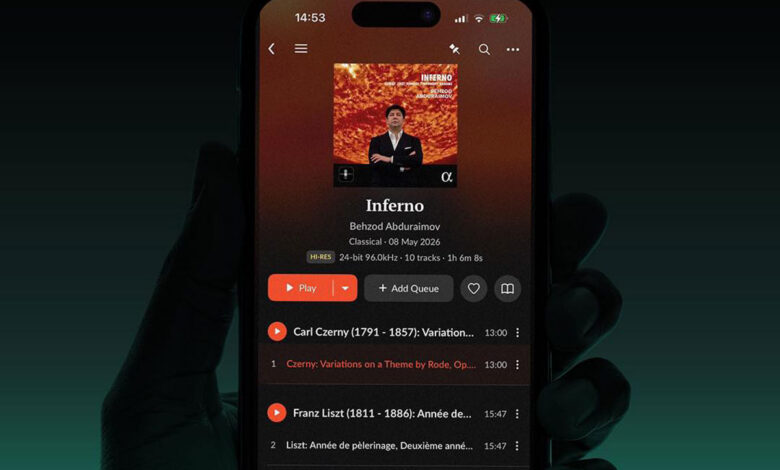
- JPLAY continues to treat the music app not merely as a remote control, but as the central working surface for serious digital listening. Version 1.4.2 sharpens that surface with new themes and more fluent ways to organise, mark and rediscover music.
JPLAY has never been one of those music apps that can be judged purely by ticking off functions. Its appeal lies just as much in how it behaves under the thumb, how quickly it gets out of the way, and how naturally it allows the listener to move between streaming catalogues, local files, playlists, favourites and reference material. With JPLAY 1.4.2, JPLAY now delivers a compact but useful update: not a dramatic reinvention, but a set of visual and operational refinements that should be felt most clearly by those who use the app every day.

Key Facts
- Product: JPLAY 1.4.2
- Category: Music app for audiophile streaming and local music playback
- Platform: Apple iOS, Apple iPadOS and Apple macOS version
- New themes: Alternative Dark, Light and Monochrome
- Operation: Theme change via Settings, Appearance, Themes
- Note: App restart required for a new theme to be applied
- New functions: expanded Add to button, multiple selection for playlists, improvements to Focus
- Availability: available now via the App Store
The new version is available now through the App Store. JPLAY describes the update primarily as a step towards greater visual variety and smoother operation, both on Apple iOS and in the Apple macOS version. In the App Store, the app is positioned as a music application for audiophile users, bringing Qobuz, TIDAL, HIGHRESAUDIO and local content into a single interface, with playback via UPnP AV and DLNA to streamers and network DACs.




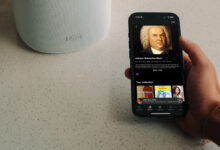
A more considered visual language with Alternative Dark, Light and Monochrome
The most immediately visible addition in JPLAY 1.4.2 is Alternative Dark, a new theme that offers a different take on the classic dark interface. It is clearly aimed at listeners who prefer a darker visual environment, but want something less familiar, less standardised, and perhaps a little more composed than a conventional dark mode.
Alongside it, JPLAY introduces two further appearance options. Light has been refreshed for a cleaner, brighter presentation, while Monochrome takes a more restrained route, reducing the interface to a quieter and more minimal visual language.
That may sound like cosmetic housekeeping, yet in a serious music app the interface is never merely decoration. During long listening sessions, visual contrast, legibility and calmness matter. A music app that feels too busy can become tiring; one that is too stark can feel clinical. JPLAY 1.4.2 gives users more room to tune the app to their habits, their display, and the way they actually listen.
Theme selection is handled through Settings, Appearance and Themes. A restart of the app is required before the selected theme is applied.
The Add to button becomes more useful
Beyond appearance, JPLAY 1.4.2 also improves how music is managed while listening. The Add to button now extends beyond standard playlist actions and allows music to be added directly to Favorites, Save for Later or rated.
This is a small change with practical weight. In a well-used digital music library, the most valuable actions are often the quick ones: mark this album for later, save this track as a favourite, rate something while the impression is still fresh. JPLAY’s updated Add to logic makes those decisions easier to capture in the moment, rather than forcing the listener to return later and tidy up.
For users who approach streaming as active collecting rather than passive playback, this matters. A large Qobuz or TIDAL habit, combined with local files and carefully maintained favourites, quickly becomes its own private archive. The more fluidly an app can manage that archive, the more useful it becomes.
Multiple playlist selection saves time where it counts
JPLAY 1.4.2 also adds support for selecting multiple playlists at once when adding music. It is one of those improvements that will barely register in a feature list, but will be appreciated by anyone who keeps several overlapping listening collections.
A track might belong in a test playlist, a late-night selection, a genre folder and a reference list. An album may be filed by mood, label, recording quality or personal relevance. Previously, adding music to several destinations often meant repeating the same process more than once. With multi-playlist selection, JPLAY removes some of that friction.
That is especially relevant for the type of listener JPLAY addresses: users with streaming subscriptions, local libraries, network playback systems and a tendency to organise music with some care. Playlist management is not an afterthought in such a setup. It is part of how a library becomes usable.
Focus, UI and UX receive further attention
JPLAY 1.4.2 also includes improvements to Focus, the app’s tool for narrowing down and navigating music collections more precisely. The more extensive the library, the more important this becomes. Once local content, Qobuz, TIDAL and personal favourites start to overlap, search and filtering are no longer secondary conveniences. They determine how quickly the listener gets from intention to music.
The update also brings several UI and UX improvements, including refinements for the Mac version. JPLAY additionally mentions bug fixes and performance improvements, which keeps the emphasis of this release firmly on stability, responsiveness and day-to-day usability.
The result is a version that does not try to change what JPLAY is. Instead, it polishes the parts of the experience that regular users are likely to touch most often: appearance, playlist handling, library navigation and general operational flow.
All benefits at a glance
- New themes with Alternative Dark, Light and Monochrome
- Greater visual choice for different listening habits
- Expanded Add to button for Favorites, Save for Later and ratings
- Add to Playlist now supports selecting multiple playlists at once
- Improvements to Focus for more targeted navigation in larger music libraries
- UI and UX optimisations, including for the Mac version
- Bug fixes and performance improvements
- Update available now through the App Store
Price and availability
JPLAY 1.4.2 is available now as an update through the App Store. The app is listed in the App Store as a free download with in-app purchases; according to the App Store information, full access to content and functions requires an active subscription. New users can make use of a 14-day trial period, which subsequently moves into an annually billed subscription unless cancelled in time.
Conclusion
JPLAY 1.4.2 is not an update designed to make noise. It is more interesting than that: a measured refinement of an app intended for people who spend serious time with music libraries, streaming services and network playback. The new themes make the interface more adaptable, the expanded Add to button improves the handling of favourites and later listening, while multi-playlist selection and Focus refinements address the everyday discipline of managing music well.
For existing users, JPLAY 1.4.2 should feel less like a new chapter and more like a better-edited page: cleaner, quicker, more comfortable, and slightly more personal. In a mature music app, that is often exactly the right kind of progress.
| Product | JPLAY 1.4.2 |
|---|---|
| Price | Free 2-week trial JPLAY Premium $ 49,99 per year, billed annually JPLAY Lifetime one-time payment $ 199,- JPLAY Lifetime for Premium subscribers one-time payment $ 149,- |
Technical Data
| Product | JPLAY 1.4.2 |
|---|---|
| Category | Music app for audiophile streaming and local music playback |
| Platform | Apple iOS, Apple iPadOS and Apple macOS version |
| New themes | Alternative Dark, Light and Monochrome |
| Theme settings | Settings, Appearance, Themes |
| Restart requirement | App restart required for a new theme to be applied |
| Streaming services | Qobuz, TIDAL, HIGHRESAUDIO |
| Local playback | Local content supported |
| Playback architecture | UPnP AV and DLNA |
| Playback devices | Streamers and network DACs |
| New functions | Expanded Add to button, multiple selection for playlists, improvements to Focus |
| Additional improvements | UI and UX improvements, bug fixes and performance optimisations |
| Availability | Available now via the App Store |
| App model | Free download with in-app purchases |
| Trial period | 14-day trial period |
| Subscription | Annual subscription after the trial period unless cancelled in time |