


HIGHRESAUDIO Download Manager Available in New Versions – More Security and Convenience When Downloading Hi-res Audio
A large Hi-res audio album can take a long time to download, and a dropped connection quickly turns that wait into a chore. HIGHRESAUDIO's free Download Manager now lets users pause and resume transfers, checks every file for completeness and adds RSA-based security measures. Versions are available for Microsoft Windows, Linux and Apple macOS, and existing users are urged to reinstall rather than simply update.

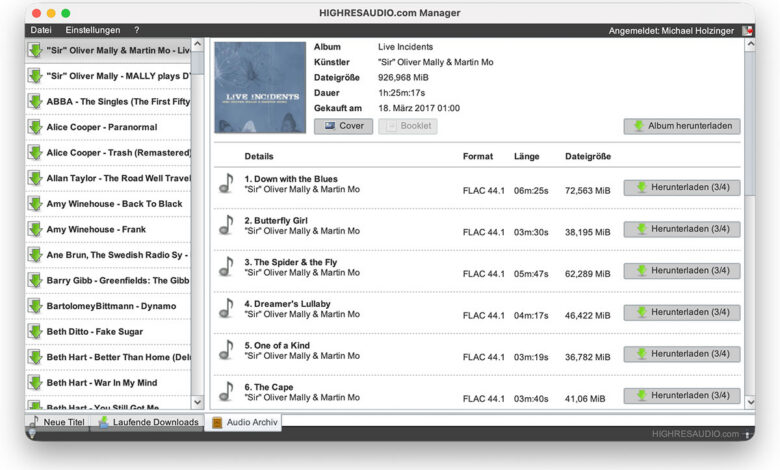
- HIGHRESAUDIO has released new, free versions of its Download Manager for Microsoft Windows (32 and 64 bit), Linux (64 bit), Apple macOS 27 and older macOS X releases, built to get purchased hi-res audio albums onto the user's computer reliably, without restarting an interrupted transfer from scratch. Alongside pause-and-resume support, the software checks downloaded files for completeness and, according to HIGHRESAUDIO, uses RSA-based security; the new versions are available now at no charge, and existing customers should uninstall their current version before installing the new one.
Buying a hi-res audio album is quick; getting it onto your computer is not always so. A single release can run to several gigabytes, and a flaky connection or an accidental shutdown can undo an hour of waiting. HIGHRESAUDIO is addressing exactly this with new versions of its Download Manager, the company’s free application for fetching purchased music. The update brings resumable downloads, automatic checks that files have arrived in full and RSA-based security, and it covers Microsoft Windows, Linux and Apple macOS.

Key Facts – HIGHRESAUDIO Download Manager
- New versions of the HIGHRESAUDIO Download Manager
- Free of charge for Windows 32/64 bit, Linux 64 bit, macOS 27 and macOS X
- Central management and archiving of purchased music downloads
- Downloads can be paused and resumed at any time
- Automatic verification that files are complete
- RSA-based security procedures
- Fresh installation expressly recommended for existing customers
Existing users: uninstall first
Before anything else, a practical point for those who already use the software. HIGHRESAUDIO explicitly advises existing customers to remove the version currently installed on their computer and then set up the new release for their operating system. The reasoning, according to the company, is that a clean installation ensures the current features and security mechanisms are the ones actually in use. Anyone planning to grab the update should therefore treat it as a replacement rather than an in-place upgrade.



Where the software runs
The Download Manager is offered across the three main desktop platforms. On the Microsoft Windows side, there are both 32-bit and 64-bit builds. Linux users get a 64-bit version, while Apple owners can choose between a build for macOS 27 and versions for older macOS X releases. HIGHRESAUDIO thus covers current systems as well as older machines that may still sit in a music corner of the house. All versions are free to download.
From purchase to personal archive
The Download Manager is HIGHRESAUDIO’s central tool for pulling down and filing the tracks and albums bought through the store. Once a purchase is complete, the music appears in the customer’s personal download area and can be transferred straight to the computer through the application. The software also handles the archiving side: it is meant to serve as the single point from which a growing library of purchased files is managed, which suits listeners who want to keep their music as files of their own for the long term.
Why large downloads need a sturdier approach
Hi-res audio files are bulky by nature, and complete albums multiply that. The longer a transfer takes, the greater the chance that something interrupts it, whether a network hiccup, a laptop lid closing or simply the need to switch the machine off. The new versions of the Download Manager are designed to make the process smoother and more efficient for exactly this kind of library-building, so that purchased music ends up complete on the user’s computer without avoidable fuss.
Pause now, finish later
One of the headline changes is flexibility. Downloads can be halted whenever needed and picked up again later, with no need to begin the whole job afresh. For heavy hi-res audio releases with long transfer times, this is a genuinely useful convenience: a download started in the evening need not monopolise the connection while the household is streaming, and a long session can be spread across several days if necessary.
Automatic checks for complete files
The application also monitors each transfer and verifies that the files are complete, with the aim of ruling out damaged downloads that go unnoticed. The purpose, as HIGHRESAUDIO describes it, is to make sure that purchased music reaches the computer in full and can then be archived without restrictions. For collectors who build and maintain a large digital library over many years, knowing that a file is intact before it is filed away matters more than it might seem; a corrupt track discovered months later is far harder to put right.
RSA-based security
Security is the second main theme of the new releases, and HIGHRESAUDIO has chosen RSA for it. RSA is a long-established asymmetric cryptographic method, used among other things for digital signatures and for exchanging cryptographic keys securely. It rests on a mathematically linked pair of keys, one public and one private, and has been a fixture of cryptography for decades, appearing in a wide range of security-critical applications. By building RSA-based mechanisms into the Download Manager, HIGHRESAUDIO signals that it wants security to carry as much weight as reliable file transfer when customers download the music they have paid for.
All benefits at a glance
- Fewer wasted hours: large hi-res audio albums are transferred more efficiently, and an interrupted download no longer means starting over.
- Downloads on your own schedule: a transfer can be stopped when the connection is needed elsewhere and resumed later.
- Confidence in what you receive: completeness checks are intended to catch damaged or partial files before they reach the archive.
- A security layer to match: RSA-based procedures complement the overall security concept.
- One place for purchases: music is ready to download directly after buying, and the software helps manage it afterwards.
- Free, on all major desktop systems: Microsoft Windows, macOS and Linux are covered at no cost.
- A library that lasts: the tool supports building a personal digital collection and keeping it in good order.
Price and availability
The new versions of the HIGHRESAUDIO Download Manager are available immediately and free of charge. They can be installed on Microsoft Windows 32/64 bit, Linux 64 bit, Apple macOS 27 and macOS X. Existing customers should first uninstall the version they currently use and then install the latest release for their operating system.
Getting to the point
Anyone who treats their music collection as a library of their own will appreciate a download tool that can be relied upon. With multi-gigabyte hi-res audio albums, the ability to resume a transfer at any time and to have files checked for completeness are simple but important comforts. That HIGHRESAUDIO keeps developing its free software, and considers security as well as convenience in doing so, is good news for listeners who want to own high-quality music files for good.
| Product | HIGHRESAUDIO Download Manager |
|---|---|
| Price | free of charge |
| Brand | HIGHRESAUDIO |
|---|---|
| Manufacturer | HIGHRESAUDIO UG |
| Distribution | HIGHRESAUDIO UG |
| More about this manufacturer at HiFi BLOG |